The App Journey · Part 1
Agentic Engineering: How to Build a Real App with AI Agents

By Robert Golabek · 15 October 2026 · 12 min read
The App Journey is a series about how I build Agentic AI Canvas with a team of AI agents: what works, what does not, and what I changed after it went wrong. This is Part 1, the method. It is how I do agentic engineering, written for anyone who wants to try it with AI coding agents on a real project, and it closes with where I think this is heading: one system that helps build itself.
If you want the story behind the product and why I build it this way, it is on the About page. This post is the practical side.
What agentic engineering means
IBM’s explainer, What is Agentic Engineering?, defines it as “the practice of using engineering expertise to orchestrate and oversee AI agents”. The same explainer credits Andrej Karpathy with coining the term in early 2026.
Some call it agentic coding. It is a step on from “vibe coding”, and I see the difference this way. Vibe coding is describe and accept: you ask for something, the AI produces it, and you take it if it seems to work. Agentic engineering is direct and verify: you decide what is being built, give each agent a job, and check what comes back before anything moves on.
For me, agentic engineering is not only getting agents to write code. It is building a system around them: the written plans they read, the roles they play, the checks they pass and the points where a person decides. Over time the app itself becomes part of that system.
I do not write most of the code by hand any more. My work is to direct the agents and check them. The rest of this post is the set of habits that makes that safe enough to rely on.
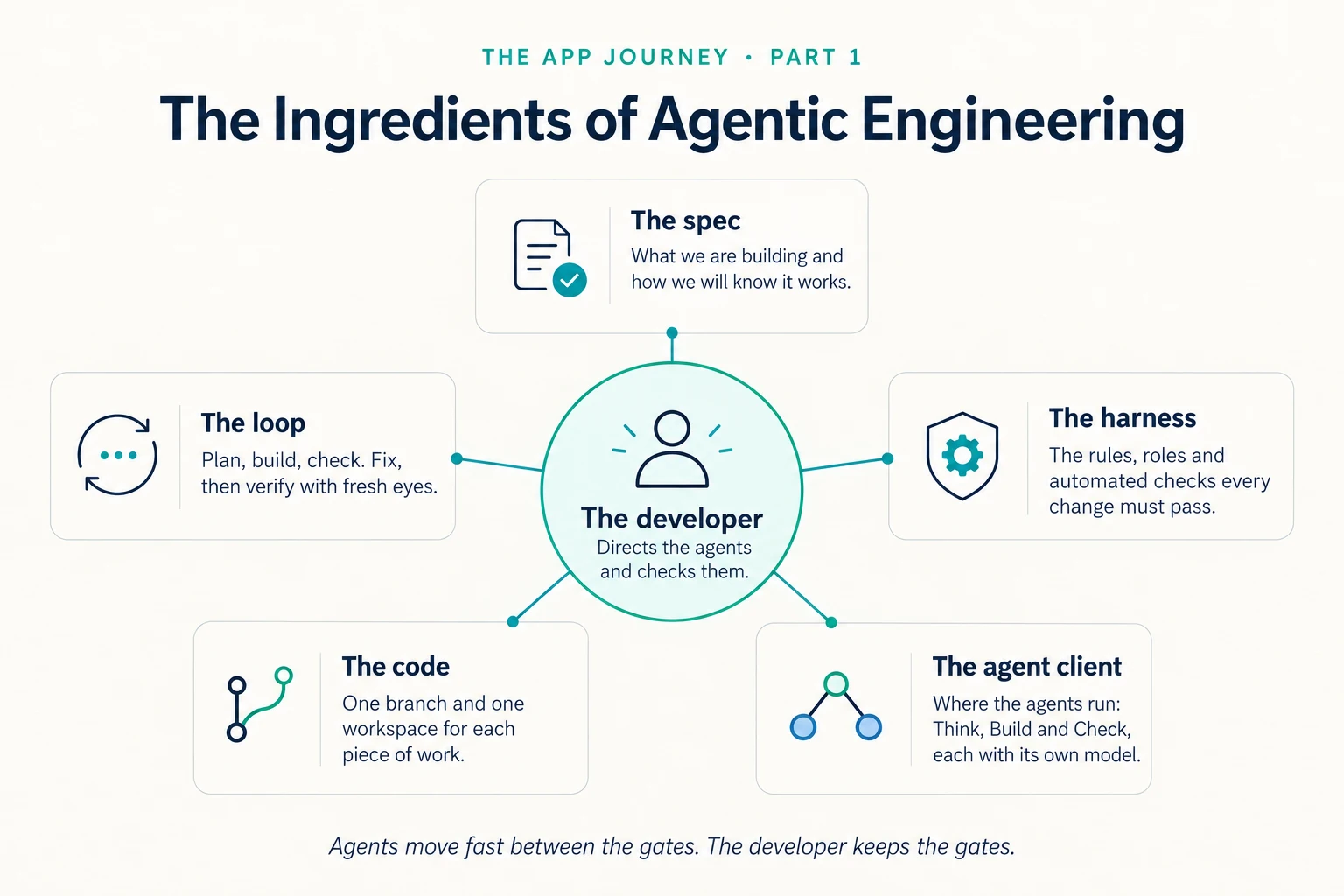
Text version of the ingredients
- The developer. Directs the agents and checks them.
- The spec. What we are building and how we will know it works.
- The loop. Plan, build, check. Fix, then verify with fresh eyes.
- The harness. The rules, roles and automated checks every change must pass.
- The code. One branch and one workspace for each piece of work.
- The agent client. Where the agents run: Think, Build and Check, each with its own model.
Agents move fast between the gates. The developer keeps the gates.
Give every kind of thinking its own role
Planning, making and checking are different kinds of thinking, so I give each its own role and its own model.
- Think. Plans, architecture and hard decisions go to Fable, the model I use for deep thinking. This stays a conversation with me, not a job I hand off and forget.
- Build. Once a task is approved, a Sonnet agent makes the change.
- Check. An Opus agent reviews the work, and often coordinates the session. It never makes the change it reviews.
The last rule matters most. An agent that grades its own work tends to find it fine. A separate reviewer, starting fresh, reads what is actually there and not what the maker meant.
Write the spec before the code
This is spec-driven development: every feature of any size starts as a folder in the repository. It holds the spec (what we are building and how we will know it works), the decisions we made and why, the plan, the list of tasks, the current status, and a running log of what happened.
AI agents start each session knowing little of the last one. The repository does not forget. Any agent can open a feature folder, see where the work stands and pick it up, including an agent that has never seen the project. If the scope changes, the change is written into the spec before anyone builds it, so the record and the code are much less likely to drift apart.
One piece of work, one branch, one workspace
Each piece of work gets its own branch and its own workspace on disk, tagged with the agent that owns it. An agent works only in a workspace carrying its own tag. It does not edit, commit to or clean up another agent’s workspace unless that has been handed over explicitly.
That rule is what makes several agents in parallel safer. Without it, two agents change the same file at the same moment and one of them wins by accident. With it, work meets at a controlled point, normally a pull request, where it is checked before it joins the main line. An agent commits straight to the development branch only when I have explicitly told it to.
Fix, then verify with fresh eyes
When a review finds a problem, one agent fixes it and a different pass checks that the fix worked. The agent that fixed it does not re-read its own change and declare it done. That second pass is the AI code review I trust.
We allow two rounds of fix and re-check. If a finding is open after the second round, it comes to me. A loop with no limit is how an agent spends an afternoon polishing the wrong thing.
Keep humans at the gates
Agents move fast between gates, and I keep the gates, which is how I keep a human in the loop. I approve scope and the decisions that change it. I approve merges that reach production, and anything that spends money or touches production data. On a pull request, continuous integration, the automated build, lint and test, must pass first. I can override it, and an override is recorded as skipped, never as passed.
Between gates I do not want to be asked permission for every step. Once the plan is approved, an agent can start the next planned task without asking. It stops when it meets a real decision: a change of scope, a conflict with another workspace, or something it was never asked to do.
What the numbers show
The commit and pull-request figures are measured from our development branch, as of 5 October 2026, and cover the 17 days from 19 September to 5 October 2026. They are from the third snapshot of our development statistics, and they are our own record, not a benchmark.
- Pace. 1,827 commits in 17 days, with a commit on every one of those days. That is 107.5 commits per active day, against 54.9 per active day in the 55 days before the window.
- Merged pull requests. 12.5 per active day before, 19.8 per active day in the window.
- Where the growth went. Mostly into written specs and tests. Per active day, the specs folder grew 2.7 times as fast as before and the tests folder 2.4 times as fast. The app’s own source code grew at about the same rate as before.
- Scale. 99 numbered feature folders, as of 5 October 2026.
- Who delivered. About 81% of the pull requests merged in the window came from Claude agents: 264 of 327, release merges not counted.
- What the agents read. Our Claude agents were sent 246 tokens of context for every token they wrote, against 334 before (a fall of 26%). I measured the token figures on my machine from session logs: 246 covers 18 September to 5 October 2026, and 334 covers only the sessions that survived from 26 August to 17 September, because the tool deletes old ones.
Volume is not the goal. A commit can be a typo fix, and more text is not more product. These numbers cannot tell you whether the work was good or whether any user got value from it. They show that output roughly doubled, and that the extra went into writing things down and testing them, not into more app code.
What went wrong, and what we changed
The method above did not arrive finished. These are four things that went wrong, and what we did about each.
A review that was narrated, not run
A report described a reviewer’s findings in convincing detail, but no separate reviewer had produced them. The same session had written the story of a review. Now a review only counts when there is evidence that a separate reviewer actually ran.
Green checks, empty files
Eleven files reached our development branch empty in one commit, among them the app’s configuration, the spec registry and a whole test file. Nothing in our automated checks would have caught it: an empty test file runs no tests, so nothing fails. We restored them from the previous commit, and we now look for emptied files before a broad commit and treat a “whole file versus empty” merge conflict as a warning sign.
Two agents, one number
Agents working in parallel picked the same number for a new feature folder, because each checked only the list of finished work, which did not show numbers already taken on branches that were in progress. Now the rule is to check every branch and workspace before taking a number, and a later clash is renamed before it merges.
Tests that guarded the wrong version
Our tests ran with a feature switch off, while the test environment we used every day ran with it on. The suite was green, and the version we were actually trying out had no coverage; three real defects were hiding there. We retired the switch and fixed the tests, and we now check which settings each environment really runs before trusting a green suite.
How to start agentic engineering on your own project
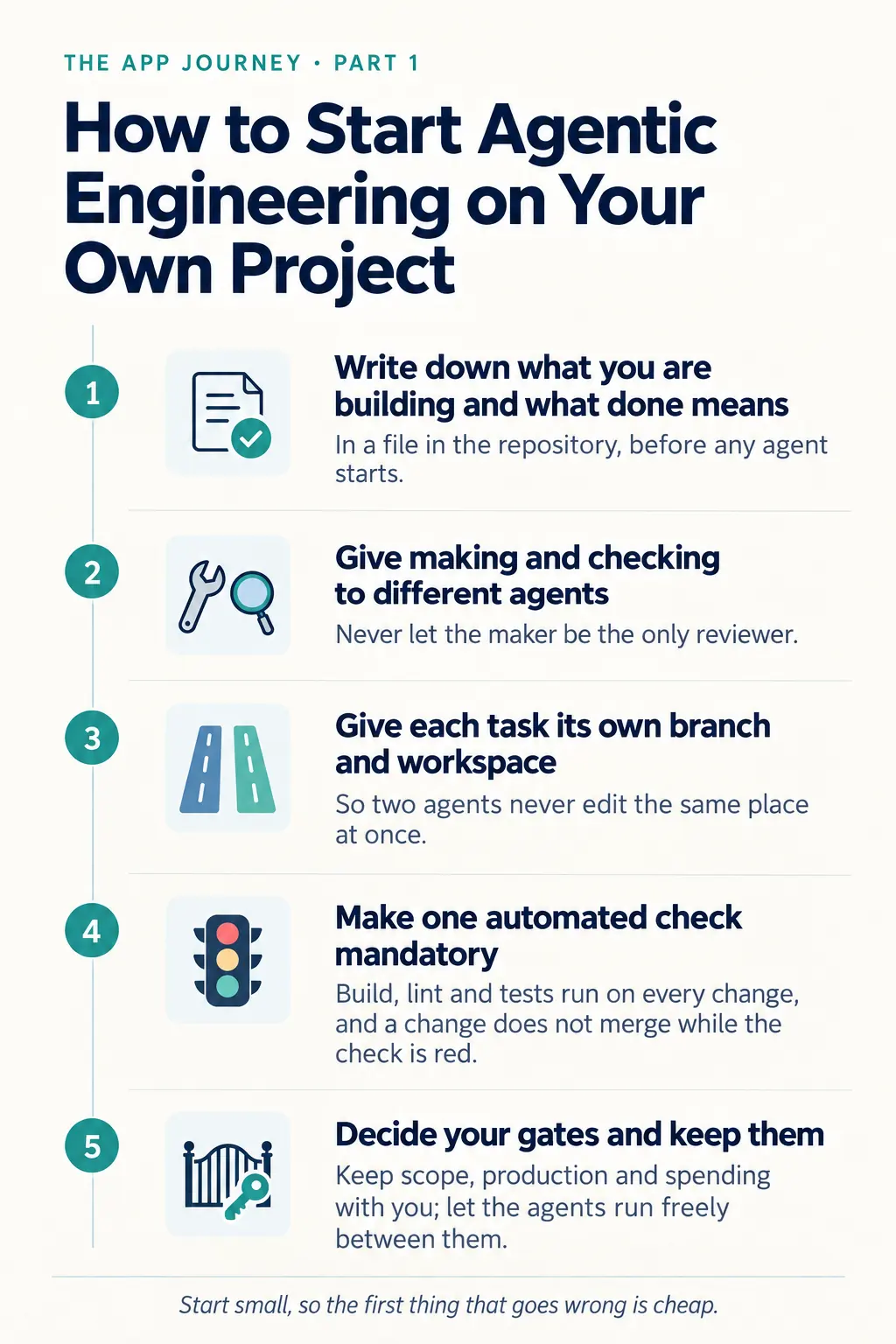
- Write down what you are building and what done means, in a file in the repository, before any agent starts.
- Give making and checking to different agents. Never let the maker be the only reviewer.
- Give each task its own branch and workspace, so two agents never edit the same place at once.
- Make one automated check mandatory. Build, lint and tests run on every change, and a change does not merge while the check is red.
- Decide your gates and keep them. Pick the few decisions that stay with you, such as scope, production and spending, and let the agents run freely between them.
Start with a small project, so that the first thing that goes wrong is cheap. Then change one habit at a time. Most of these habits began as a fix for something that broke.
Where this is going: one system
Everything above is a set of parts. Here is what I call each one, and how they fit together.
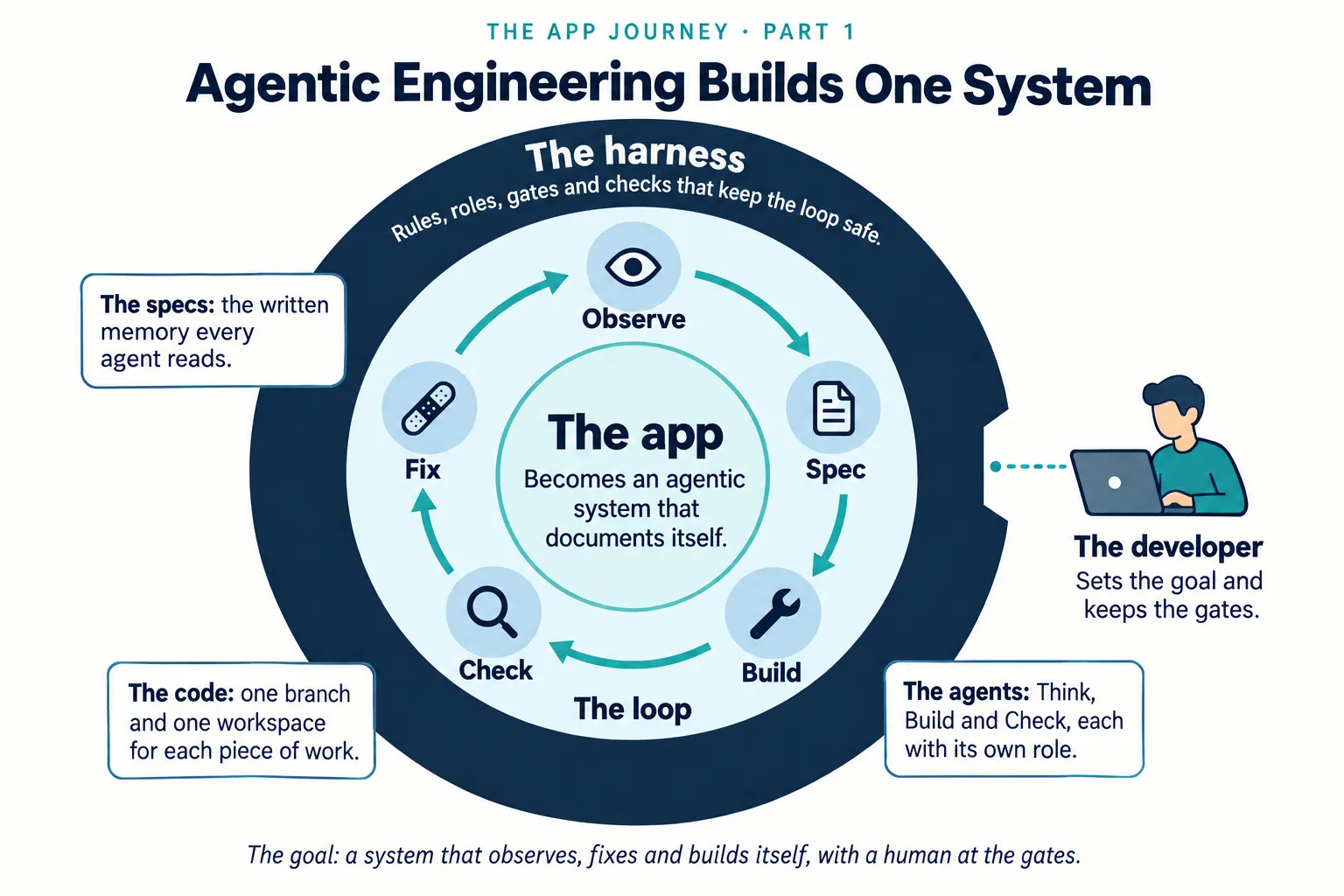
Text version of the one-system diagram
- The harness. Rules, roles, gates and checks that keep the loop safe.
- The loop. Observe, Spec, Build, Check, Fix.
- The app. Becomes an agentic system that documents itself.
- The specs. The written memory every agent reads.
- The code. One branch and one workspace for each piece of work.
- The agents. Think, Build and Check, each with its own role.
- The developer. Sets the goal and keeps the gates.
The goal: a system that observes, fixes and builds itself, with a human at the gates.
- The specs. The written memory every agent reads, so work survives from one session to the next.
- The agents. The Think, Build and Check roles, each doing one kind of work.
- The harness. The agentic harness is the setup around the agents: the written rules, the roles, the branch-and-workspace rule, the mandatory automated check and the human gates. It works from outside the app, and it changes the app only through reviewed changes and a release I approve.
- The loop. Plan, build, check, fix and verify, then write down what happened. Every piece of work goes round the same cycle. Loop engineering is designing that cycle deliberately.
- The app. Spec work leaves a spec, decisions and a log in the repository, so the app documents itself. That record is what lets an agent see where things stand and suggest the next step.
- The runtime. Inside the app, the agentic runtime is the engine the app’s own agents run on, such as the Brain’s Agent mode, with its limits and the approvals a user gives. What the runtime does is what the harness tests and watches, and that is how the app and the tooling around it become one system.
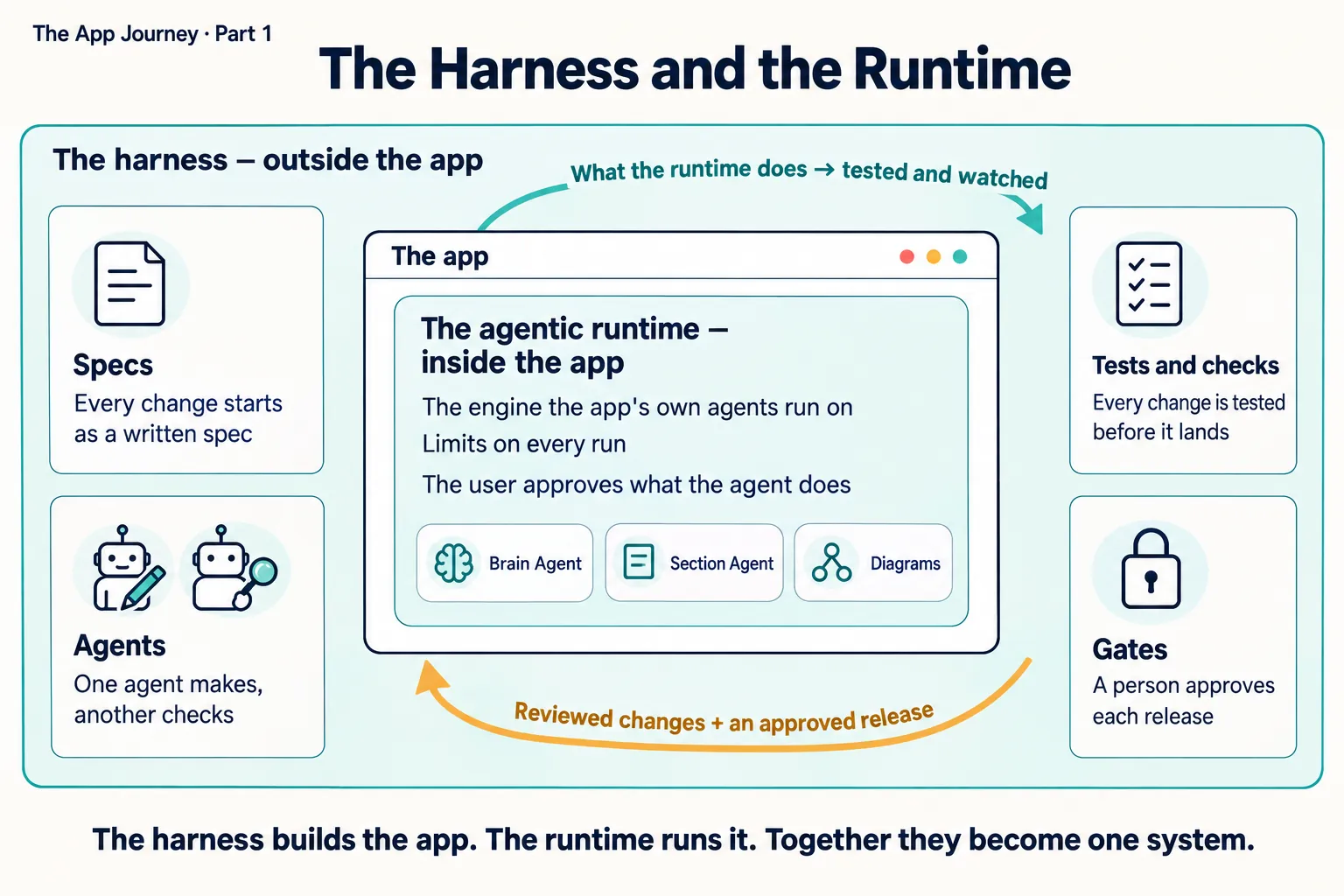
Text version of the harness and runtime diagram
The App Journey · Part 1: The Harness and the Runtime
The harness — outside the app
- Specs. Every change starts as a written spec.
- Agents. One agent makes, another checks.
- Tests and checks. Every change is tested before it lands.
- Gates. A person approves each release.
The app → The agentic runtime — inside the app
- The engine the app’s own agents run on.
- Limits on every run.
- The user approves what the agent does.
- Agents: Brain Agent, Section Agent, Diagrams.
Arrow out: What the runtime does → tested and watched. Arrow in: Reviewed changes + an approved release.
The harness builds the app. The runtime runs it. Together they become one system.
The goal is one system that observes itself, fixes what it finds and helps build itself, with a person at the gates. That is the goal, not where things are today. Today I approve scope, merges to production and spending, and the agents do not fix or build the app on their own. The first step is the app’s own Product Manager agent, which reads where the work stands and suggests what to run next.
Next in The App Journey
More parts are coming. The next part tells how the app outgrew one person’s view and why we built its own Product Manager agent. Other likely topics include how we measure what our agents read, and how to direct agents well. I will not promise dates or an order.
Frequently asked questions
What is agentic engineering?
IBM’s explainer calls it “the practice of using engineering expertise to orchestrate and oversee AI agents”. In our own words: you direct AI agents to build software, and you stay responsible for what they build, which means writing down what you want, splitting the roles, checking the results and keeping the decisions that matter.
Is agentic engineering the same as vibe coding?
No. Vibe coding is describing what you want and accepting what the AI gives you. Agentic engineering keeps the same tools but adds direction and verification: a written spec, separate roles for making and checking, and a person at the decisions that cannot be undone.
What is the goal of agentic engineering?
For me it is one system: agents, specs, a harness and a repeatable loop around them, with the app documenting itself so that the system can observe where things stand, fix what it finds and help build itself, with a person at the gates. That is the goal, not today’s state. Today I approve scope, merges to production and spending.
Do you review the code?
Not every line myself. A separate reviewer agent reads each change, automated checks run on every pull request, and I read what they report and decide whether it merges. The rule is that the agent which made a change never grades it.
Which agents do you use?
Mostly Claude models through Claude Code, each in a fixed role: one for planning and architecture, one for making changes and one for review. Other coding agents have done a smaller share of the work. The method does not depend on any one vendor.
Where the plan lives
Agentic engineering starts with a written plan. Agentic AI Canvas helps with that part: it keeps the business context, the decisions and the plan together for people to review. It does not run agents or write the code. Start a planning conversation when you are ready to write the first decisions down.